Next word Prediction using LSTM and GRU



Introduction
This project aims to develop a deep learning model for predicting the next word in a sequence of words. The model is built using Long Short-Term Memory (LSTM) and GRU (Gated Recurrent Unit) networks, which are well-suited for sequence prediction tasks.
Steps followed
The project includes the following steps:
Data Collection: We use the text of Shakespeare’s Hamlet as our dataset. This rich, complex text provides a good challenge for our model because it is not just normal English; it is difficult to understand. We will train our models with this dataset.
Data Preprocessing: The text data is tokenized, converted into sequences, and padded to ensure uniform length. The sequences are then split into training and test sets.
Model Building: An LSTM model is constructed with an embedding layer, two LSTM layers, and a dense output layer with a softmax activation function to predict the probability of the next word. Same process is followed for GRU model.
Model Training: The model is trained using the prepared sequences, with early stopping implemented to prevent overfitting. Early stopping monitors the validation loss and stops training when the loss stops improving.
Model Evaluation: The model is evaluated using a set of example sentences to test its ability to predict the next word accurately.
Deployment with Streamlit: A Streamlit web application is developed to allow users to input a sequence of words and get the predicted next word in real-time.
Data Collection and Processing
Data Collection
We will use the NLTK library, specifically the Gutenberg corpus, which contains text files such as Shakespeare’s Hamlet.
First, we import NLTK and download the Gutenberg package. Then, we import the Gutenberg corpus from NLTK.
Next, we load the dataset by accessing the raw text of “shakespeare-hamlet.txt” from the Gutenberg corpus. We save this data to a local file named hamlet.txt by opening the file in write mode and writing the raw text content into it.
1
2
3
4
5
6
7
8
import nltk
nltk.download('gutenberg')
from nltk.corpus import gutenberg

data = gutenberg.raw('shakespeare-hamlet.txt')

with open('hamlet.txt', 'w') as file:
    file.write(data)
Data Preprocessing
For preprocessing, we import necessary libraries: numpy as np, TensorFlow Keras’s Tokenizer and pad_sequences for text vectorization and sequence padding, and scikit-learn’s train_test_split for splitting the dataset.
The Tokenizer converts text into sequences of integers representing word indices. The pad_sequences function ensures all sequences have the same length, which is essential for training LSTM RNN models.
We read the saved hamlet.txt file in read mode and convert all text to lowercase for uniformity. Then, we initialize the tokenizer and fit it on the text, which creates a word index mapping.
We calculate the total number of unique words by taking the length of the tokenizer’s word index and adding one, as indexing starts from zero.
1
2
3
4
5
6
7
8
9
10
11
12
import numpy as np
from tensorflow.keras.preprocessing.text import Tokenizer
from tensorflow.keras.preprocessing.sequence import pad_sequences
from sklearn.model_selection import train_test_split

with open('hamlet.txt', 'r') as file:
    text = file.read().lower()

tokenizer = Tokenizer()
tokenizer.fit_on_texts([text])

total_words = len(tokenizer.word_index) + 1
Creating Input Sequences
We create input sequences from the text to train the model to predict the next word given a sequence of words.
We split the text line by line and convert each line into a sequence of word indices using the tokenizer’s text_to_sequences method.
For each tokenized line, we generate n-gram sequences by progressively taking slices of the sequence from the start up to each word, appending these sequences to the input sequences list.
This process converts every sentence into multiple sequences of increasing length, which will be used as input data for the model.
1
2
3
4
5
6
input_sequences = []
for line in text.split('\n'):
    token_list = tokenizer.texts_to_sequences([line])[0]
    for i in range(1, len(token_list)):
        n_gram_sequence = token_list[:i+1]
        input_sequences.append(n_gram_sequence)
Padding Sequences
Since LSTM models require input sequences of the same length, we find the maximum sequence length among all input sequences.
We then pad all sequences to this maximum length using pre-padding (adding zeros at the beginning) so that shorter sequences are extended to the same length.
This ensures uniform input size for the model training.
1
2
max_sequence_len = max([len(x) for x in input_sequences])
padded_sequences = pad_sequences(input_sequences, maxlen=max_sequence_len, padding='pre')
Creating Predictors and Labels
We split the padded sequences into predictors (input features) and labels (output features). The predictors are all words in the sequence except the last one, and the label is the last word.
The labels are then converted into categorical format using one-hot encoding, where the number of classes equals the total number of unique words.
This prepares the data for training a classification model to predict the next word.
1
2
3
4
5
import tensorflow as tf

X = padded_sequences[:, :-1]
y = padded_sequences[:, -1]
y = tf.keras.utils.to_categorical(y, num_classes=total_words)
Train-Test Split
Finally, we split the dataset into training and testing sets using an 80-20 split. This allows us to train the model on the majority of the data and evaluate its performance on unseen data.
1
X_train, X_test, y_train, y_test = train_test_split(X, y, test_size=0.2)
Model Buildling and Training
First, we import the necessary modules from TensorFlow Keras. We specifically use the Sequential model. Along with this, we import the Embedding, LSTM, Dense, and Dropout layers. The dropout layer is used to disable some neurons during training to prevent overfitting.
1
2
from tensorflow.keras.models import Sequential
from tensorflow.keras.layers import Embedding, LSTM, Dense, Dropout
Next, we define our model by initializing a Sequential object. We add an embedding layer with parameters: total number of words, embedding dimension of 100.
1
2
model = Sequential()
model.add(Embedding(total_words, 100))
Following the embedding layer, we add an LSTM layer with 150 neurons and set return_sequences=True to allow stacking another LSTM layer. Then, we add a dropout layer to disable 20% of the neurons during training to reduce overfitting.
1
2
model.add(LSTM(150, return_sequences=True))
model.add(Dropout(0.2))
We add a second LSTM layer with 100 neurons. This layer does not return sequences as it is the last recurrent layer before the output.
1
model.add(LSTM(100))
Finally, we add a dense output layer with the number of units equal to the total number of words. We use the softmax activation function because this is a multi-class classification problem.
1
model.add(Dense(total_words, activation='softmax'))
Next, we compile the model. We use categorical cross-entropy as the loss function since it is a multi-class classification task. The optimizer is Adam, and we track accuracy as the metric.
1
model.compile(loss='categorical_crossentropy', optimizer='adam', metrics=['accuracy'])
We can check the model summary to see the layers and the total number of trainable parameters. This helps verify the model architecture.
1
model.summary()
Now, we proceed to train the model. We call the fit method, passing the training data (X_train, y_train), setting the number of epochs to 100, and providing validation data (X_test, y_test). We set verbose=1 to display training progress.
To improve training efficiency and prevent overfitting, you can implement early stopping. This technique stops training when the validation loss stops improving.
First, import the EarlyStopping callback from TensorFlow Keras. Then, define the callback and pass it to the fit method.
1
2
3
4
5
from tensorflow.keras.callbacks import EarlyStopping

early_stopping = EarlyStopping(monitor='val_loss', patience=8, restore_best_weights=True)

history = model.fit(X_train, y_train, epochs=100, validation_data=(X_test, y_test), verbose=1, callbacks=[early_stopping])
Note: For some reason, when I am using callbacks, it is stopping early, and the validation loss is not decreasing for this dataset. This requires further investigation. But, for now, I am training the model without any callbacks.
The same process is followed for training the GRU model, only change is using GRU instead of LSTM in the model architecture.
Model Evaluation
We will create a function that predicts the next word. This function requires the model, tokenizer, input text, and the maximum sequence length as inputs.
First, the tokenizer converts the input text into a sequence of tokens. If the length of this token list is greater than or equal to the maximum sequence length, we adjust the token list to ensure its length matches the maximum sequence length minus one. This is done by slicing the token list from the appropriate index to the end.
We are doing -1 to match the input text tokens to the model’s training input.
Next, we apply pre-padding to the token list to match the required input length for the model.
Then, we use the model’s predict method on this padded token list to obtain the predicted word index. We select the index with the highest probability among all outputs.
Finally, we convert this predicted index back into the corresponding word by iterating through the tokenizer’s word index mapping and returning the matching word.
1
2
3
4
5
6
7
8
9
10
def predict_next_word(model, tokenizer, text, max_sequence_len):
    token_list = tokenizer.texts_to_sequences([text])[0]
    if len(token_list) >= max_sequence_len:
        token_list = token_list[-(max_sequence_len - 1):]
    token_list = pad_sequences([token_list], maxlen=max_sequence_len - 1, padding='pre')
    predicted_probs = model.predict(token_list)
    predicted_index = predicted_probs.argmax(axis=1)[0]
    for word, index in tokenizer.word_index.items():
        if index == predicted_index:
            return word
Let’s consider an example input text: “To tell the secrets of my”. We will define the maximum sequence length based on the model’s input shape plus one to maintain consistency.
We then call the predict_next_word function with the model, tokenizer, input text, and max sequence length. The predicted next word is printed.
1
2
3
4
input_text = "to be or not to be"
max_sequence_len = model.input_shape[1] + 1
next_word = predict_next_word(model, tokenizer, input_text, max_sequence_len)
print(f"Next word prediction: {next_word}")
After completing the training and testing, the model is saved to a keras file named next_word_lstm.keras. Additionally, the tokenizer is saved using Python’s pickle module to a file named tokenizer.pickle. This ensures that the same tokenizer can be used later for consistent text processing and predictions.
1
2
3
4
5
6
import pickle

model.save('next_word_lstm.keras')

with open('tokenizer.pickle', 'wb') as handle:
    pickle.dump(tokenizer, handle, protocol=pickle.HIGHEST_PROTOCOL)
Streamlit App
The app allows users to enter a short sequence of words and predicts the most likely next word based on a trained neural network model. It supports both LSTM and GRU architectures, enabling easy comparison between the two.
The application starts by loading a pre-trained tokenizer and deep learning models saved in .keras format. The tokenizer is shared across both models to ensure consistent word-to-index mapping. To improve performance, the selected model (LSTM or GRU) is loaded only when required using Streamlit’s caching mechanism.
The user interface is created using Streamlit components such as selectbox, text_input, and button. Users can choose the model type (LSTM or GRU) from a dropdown, enter a sequence of words, and trigger prediction by clicking a button.
When the user submits input text, it is converted into a sequence of integers using the tokenizer. The sequence is trimmed to match the model’s expected input length and padded where necessary. This ensures that the input data aligns with the format used during model training.
The processed input sequence is passed to the selected deep learning model to generate a probability distribution over the vocabulary. The word with the highest predicted probability is selected as the next word. A reverse lookup is then performed to convert the predicted index back into a readable word.
Once the prediction is generated, the result is displayed on the Streamlit interface along with the selected model name. This allows users to clearly see which model produced the prediction and compare outputs between LSTM and GRU models.
To deploy the app on Streamlit Cloud, all required Python libraries are listed in a requirements.txt file.
The application is deployed using Streamlit Cloud by connecting the GitHub repository to the Streamlit platform. After selecting the repository, branch, and main app file, Streamlit Cloud automatically builds and deploys the application.
You can access the deployed application here
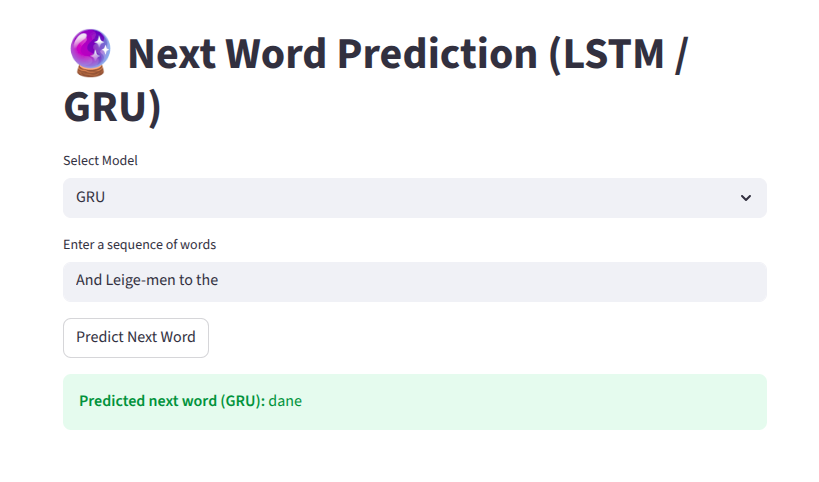 screenshot of the streamlit app
Conclusion
This project showcases my ability to take an NLP deep learning model from experimentation to a fully deployed, user-facing application. By integrating both LSTM and GRU architectures into a single Streamlit interface, the project demonstrates hands-on experience with sequence modeling, text preprocessing, and real-time inference.